AI commentary translation vs multilingual AI commentary
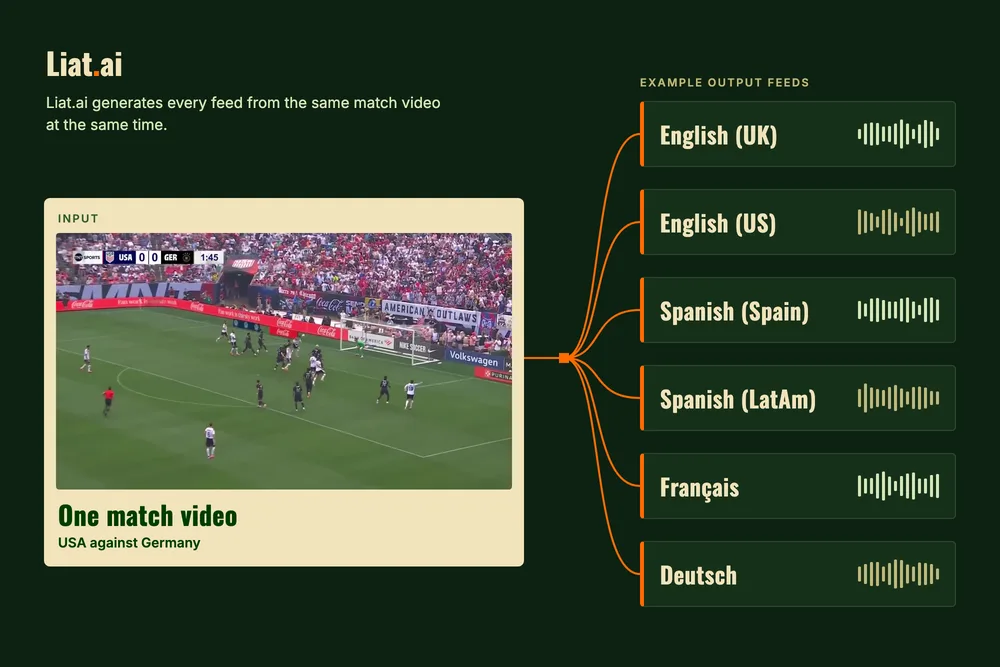
There are two ways to use AI to put a live match out in more languages. AI commentary translation, often called dubbing, takes the commentary a commentator is already giving and turns it into other languages. Multilingual AI commentary writes and speaks new commentary in each language, straight from the match video. Each one starts from something different, and that decides which one fits your matches.
How AI commentary translation works
A live translation system listens to the commentary on your broadcast. It works out who is speaking, translates what they say, and speaks it again in each target language, often in a copy of the original commentator's voice.
Many companies offer this for live sport. CAMB.AI's DubStream takes the live audio feed, separates the speakers, clones each commentator's voice and puts out dubbed streams in many languages at once. Spalk translates your live source commentary feed into other languages in real time, and draws on a large archive of past commentary to match how each moment should sound.
Every one of these products starts from a commentator. The match needs commentary in at least one language before it can have commentary in any other.
Why the emotion does not translate
Translation can carry the words of a commentary very well. The emotion stays the same as in the original language, and that is the biggest drawback.
Commentary sounds different from one language to the next. Spanish and Arabic commentary is usually more excited, and it leans on simpler words. English commentary sounds very different, and it uses a wider vocabulary. A translated feed keeps the pace and the emotion of the language it started in, so a Spanish viewer hears English commentary in Spanish words.
Liat.ai writes each language in the way that language is commentated. The Spanish feed sounds like Spanish commentary, and the English feed sounds like English commentary.
How multilingual AI commentary works
Liat.ai starts from the match video. Its advanced proprietary models watch the match from a single camera feed, follow every player and the ball, and detect each event and the player who made it. It then writes the commentary in each language directly and speaks it live, with minimal latency.
Liat.ai can commentate in 20+ languages. You also choose the region the language is spoken in, such as English (UK) or English (US), and Spanish (Spain) or Spanish (LatAm), and the voice changes with the region. Every feed comes from the same match video at the same time.
Because each feed is written on its own, each one can be set on its own. The Spanish feed can be neutral while the English feed is biased to the home team. One feed can be excited and another calm. You can also give your viewers a set of languages to switch between.
The main differences
- What you need first. Translation needs a commentator in one language. AI commentary needs the match video.
- What the viewer hears. With translation, every language carries the same commentary, with the emotion of the original. With AI commentary, each language gets commentary written in that language's own style.
- How far each feed can differ. A translated feed follows the original commentator's words and view of the match. An AI commentary feed can have its own tone, its own excitement and its own team.
- What it costs. Translation adds to the cost of the commentator it starts from. Commentary on Liat.ai starts from about $3 a match.
Working with the commentator you already have
If a match already has a commentator, Liat.ai can work alongside them. It can listen to their commentary and use what they say as another source of knowledge about the match, to confirm facts before it speaks.
Liat.ai can also clone your commentator's voice and have it commentate in other languages. The result depends on the quality of the voice recording and on the source language.
A broadcaster can also keep its commentator on the main feed and add AI commentary feeds in other languages, each with its own tone.
Which one fits your matches
Translation fits a match that already has a commentator your audience wants to hear in every language, word for word. A flagship match with a well-known voice is the clearest case.
AI commentary fits the matches that have no commentary to start from. That includes lower leagues, youth and academy football, and the extra matches a league or platform streams on the same day. It also fits any market that wants commentary in its own style, or its own feed, such as a home feed and an away feed from the same match.
Setting up languages with Liat.ai
- Send the match video to Liat.ai over SRT, RTMP or HLS.
- Choose the languages, and the region for each one.
- Set the voice, the tone and any team bias for each feed.
- Send the team sheets and how you want the names pronounced (optional).
- Take each feed back as the finished stream, as audio on its own, or as timestamped audio clips.
You can change the language settings for any feed during the match.
You can hear the same match in several languages on the commentary page and try the languages in the demo. How automated AI sports commentary works explains each step from the match video to the spoken commentary, and the solutions page shows how broadcasters, leagues and streaming platforms use it.