How to Add Live AI Commentary to Grassroots Football
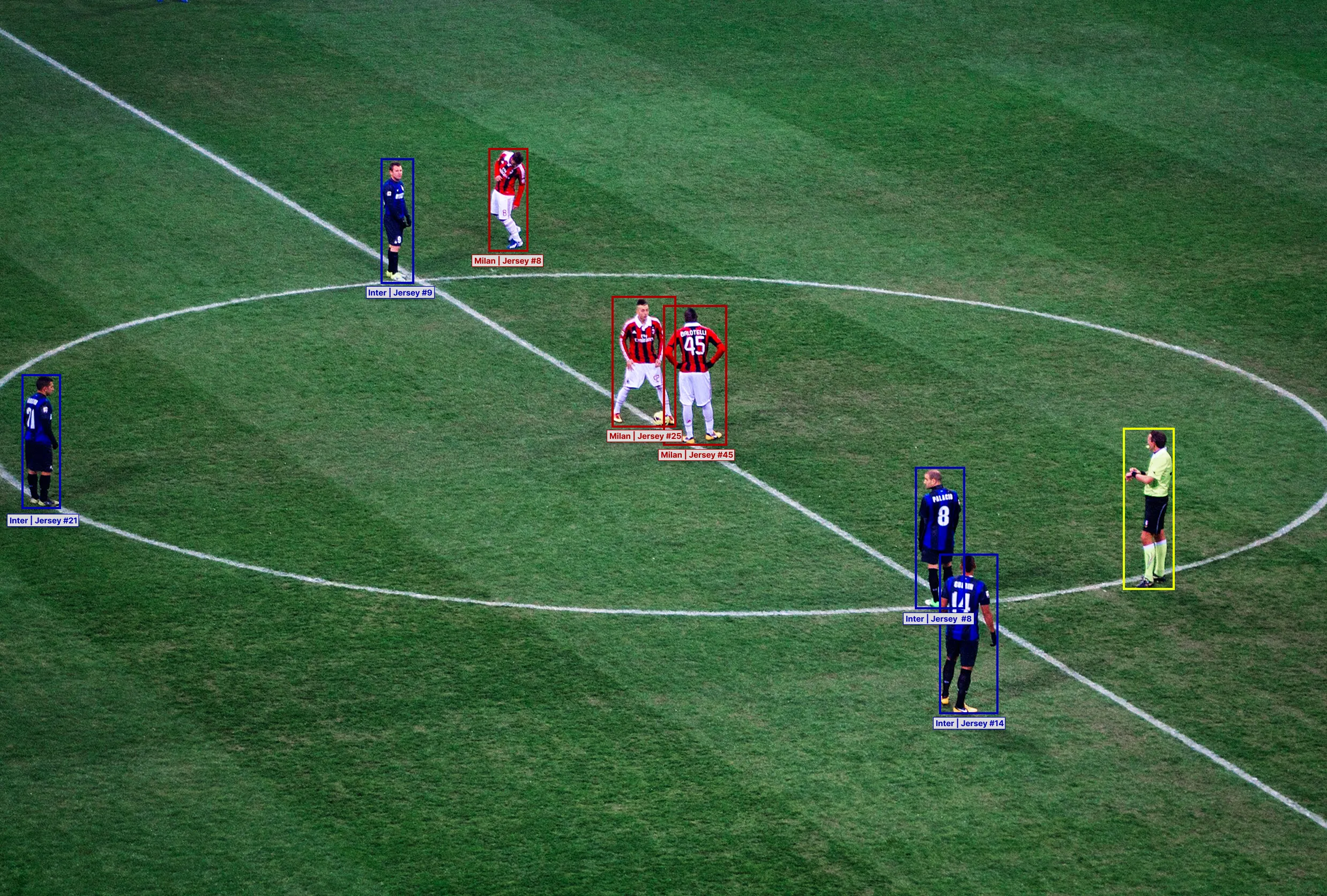
Grassroots clubs, academies, amateur sides and non-league teams stream more of their matches every season, and most of those streams have no commentary on them. There are three ways to add live commentary to a stream like this. From the cheapest to the most expensive, they are live AI commentary, a remote commentator and a commentator at the ground.
What you need before kick-off
Commentary sits on top of a stream that already works, so get the basics right first.
- A camera with a clear, wide view of the whole pitch, from the highest position you can find. We recommend a 1080p camera stream.
- A stable internet connection at the ground.
- A phone, a laptop or a streaming box to send the stream from.
- Permission to stream the match.
- A team sheet with the names and jersey numbers of both sides.
The team sheet takes two minutes to collect. Without it, nobody on the microphone and no piece of software can put a name to the player on the ball.
One decision shapes everything else: is the commentary live, or is it added to the recording afterwards? Live is harder, and it is worth more. The people watching a grassroots stream are usually watching because they cannot be at the ground.
The cheapest option: live AI commentary
Live AI commentary is software that watches the match video and speaks the commentary itself, live, with no commentator at the ground.
Liat.ai uses advanced proprietary models to watch the match from a single camera feed. It follows every player and the ball, and it detects each event and the player who made it. It then speaks the commentary with minimal latency, in the language and the voice you choose.
Liat.ai starts from about $3 a match. At that price, a club or a league can put commentary on every fixture in the season. The same match can also go out in more than one language at once.
Liat.ai commentates on what it detects in the video and on what you tell it about the match. It knows the score, the line-ups and the story of the match so far. It does not know what the manager said at half time. If a match already has a commentator your supporters like, keep them. Liat.ai is for the matches that never had the budget for one.
Judge any AI commentary on your own football. A recording of one of your own matches is the fairest test.
The middle option: a remote commentator
A remote commentator watches your stream from home and commentates on what they see. Their voice is then mixed back in with your video before it goes out.
A good freelance commentator starts at about $60 an hour. With preparation and the match itself, that comes to at least $180 a match. You pay for their time but not for their travel, and one person can cover matches at grounds far apart on the same weekend. Local radio stations sometimes have a commentator who covers non-league matches. Student broadcasting courses are another route. The student needs match footage for a showreel, and the club needs a voice.
The stream reaches the commentator a few seconds late, and it only shows what your camera shows. A remote commentator cannot see the substitute warming up or the player who went down off camera. Test the setup before match day so the voice and the picture stay in step.
One commentator also means one language. A second language needs a second commentator and a second fee.
The most expensive option: a commentator at the ground
A commentator at the ground sees the whole match, hears the crowd and can talk to the managers and the players before kick-off and at half time. Some clubs already have a matchday announcer who can do it.
Give your commentator a headset or a directional microphone rather than the camera's built-in one. A camera microphone picks up the wind and the people standing next to it. Put them where they can see the whole pitch, give them both team sheets, and ask them to say the score and the time every few minutes. Viewers arrive late and leave early.
This is the most expensive option. You pay the same fee as for a remote commentator, at least $180 a match, and their travel to every ground on top. The club also needs its own commentary kit once: a broadcast headset, a small audio mixer and the cables to connect them to the stream. Good kit costs about $1,000 to set up.
As with a remote commentator, one commentator commentates in one language. One showcase match is affordable. Thirty matches across a season usually are not.
How to add live AI commentary with Liat.ai
- Set up your camera and your stream as you normally would. Liat.ai needs one camera and a stable connection.
- Send the video to Liat.ai. Streaming software such as OBS sends it the same way it sends a stream to YouTube, to an address we give you.
- Send the team sheets for both sides before kick-off, with names and jersey numbers. The league table, recent results and any local rivalry can help enrich the commentary (optional).
- Choose the language, the voice and the tone. Liat.ai can commentate in 20+ languages, and for a club stream you can make the commentary biased to your team.
- Take the commentary back. We can hand you the finished stream with the commentary already on your video, or the audio on its own for you to mix yourself. You then put it on the platform your supporters already watch.
- After the final whistle, Liat.ai makes highlight videos with commentary on them, ready to post.
If your stream can allow a few seconds of delay, Liat.ai sees what comes next before it speaks. That makes it more certain of what is happening now.
Adding commentary on YouTube, Facebook, TikTok and Twitch
The mechanics are similar on every platform, and the differences are in the details.
Most clubs stream through software such as OBS. It takes your camera and your commentary as separate inputs and mixes them before sending. That separation is what lets you add a commentary track, swap it, or run one language on one stream and another language elsewhere.
Each platform has its own rules about streaming from software. YouTube asks you to turn on live streaming for a channel before its first stream, and that can take up to a day. TikTok only gives a stream key for streaming software to some accounts. Most platforms also check the audio of a stream for copyrighted music, so do not play music into the broadcast.
Whatever the platform, keep the commentary separate from the crowd sound in your mix, so you can raise one without losing the other. Crowd noise under a voice is what makes a small stream sound like a broadcast.
You can hear Liat.ai commentary on the demo page, read how it works on the technology page, and see how leagues and clubs use it on the solutions page. The FAQ answers the common questions about cameras and setup.